Voice TX or voice macros let you record, play, and save short voice messages for quick transmission. Each radio has 8 independent slots. Slot labels are per-radio and persist in your configuration.
Opening the Voice TX Window
Open it from Tools → Voice TX.
Editing a Slot
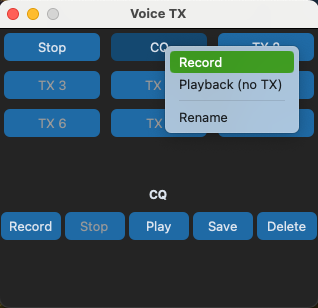
- Right-click a slot
- Select Record or Playback from the context menu
- Record, play, save or delete the recording associated with the slot
The recorded audio is stored in the slot and can be played back at any time.
Slot Labels
Each slot can be given a label (e.g. "CQ Satellite" or "QSY 2m"). Right-click a slot to rename it. Labels are per-radio and persist across restarts.
Per-Radio Storage
Voice TX slots are stored per-radio — each radio keeps its own set of 8 slots with independent labels. Switching radios in the Connection tab changes the set of slots and labels shown in the Voice TX window.
Saved recordings are stored as files in your Pycom directory at ~/Pycom/voice_tx/ (Windows: %USERPROFILE%\Pycom\voice_tx\) and persist across restarts. Because saved audio is stored as files, you can copy recordings between radios by copying the files between the per-radio subdirectories.