The Audio Settings window configures how Pycom handles audio input and output when connected to your radio over the network. Open it from Settings → Audio Settings.
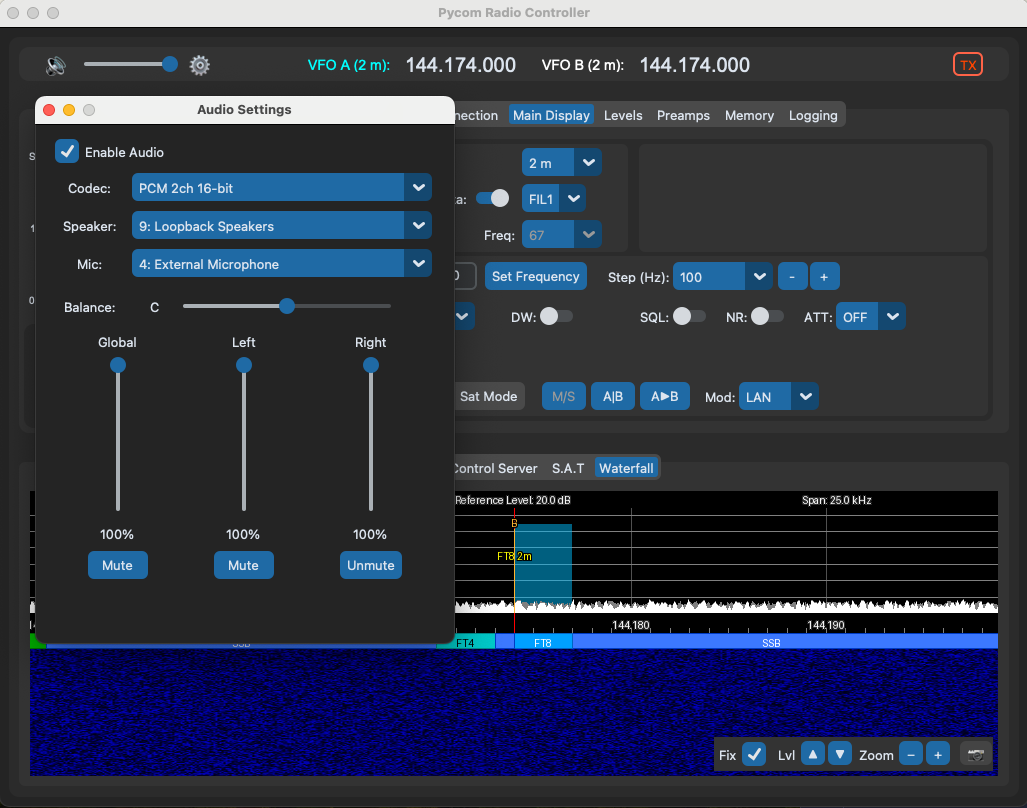
Main Window Controls
The main application window includes three audio controls alongside the main interface:
- Mute: Silences the speaker output immediately. Click again to unmute.
- Volume: Adjusts the overall speaker volume level.
- Settings: Opens the Audio Settings window for detailed configuration of codec, devices, and per-channel controls.
Codec Selection
Choose between one-channel and two-channel audio codecs:
- One-channel codec: Sends and receives a single audio stream. Use this for simple voice operation where you only need the Main band. Audio is sent to both the left and right speakers.
- Two-channel codec: Sends and receives two independent audio streams simultaneously — the left channel carries Main band audio and the right channel carries Sub band audio. Useful for full-duplex operation where you need to hear both main and sub receivers.
Switch between one-channel and two-channel at any time — no reconnect is needed.
Stereo controls (balance, left/right volume, left/right mute) are automatically disabled when the one-channel codec is selected.
Channel Routing
In two-channel mode, the audio is split across left and right:
- Left channel: Main band audio
- Right channel: Sub band audio
Use the stereo balance slider to adjust the relative level between Main (left) and Sub (right). Each channel also has its own independent volume and mute control.
Device Selection
- Speaker Device: Choose which audio output device Pycom uses to play received audio.
- Microphone Device: Choose which audio input device Pycom uses to capture your transmitted audio.
Per-Channel Controls
- Volume: Independent volume slider for each audio channel.
- Mute: Mute either the Main (left) or Sub (right) channel independently.
Audio controls are disabled when connected via serial/USB — they only apply to network (UDP) connections.
All audio settings persist across sessions.