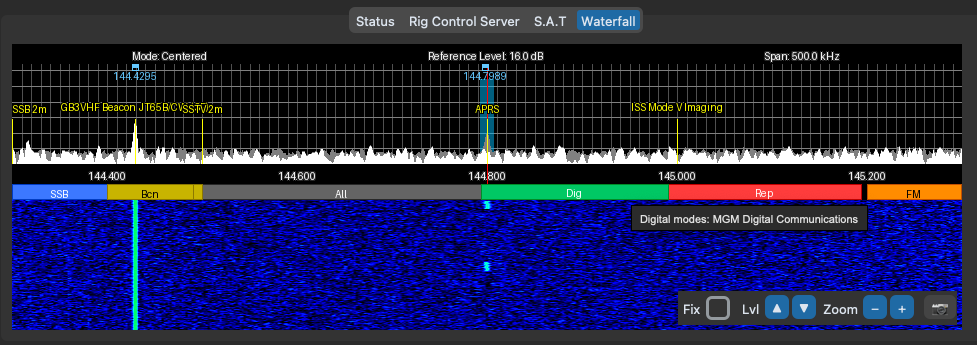
The band plan strip appears on the waterfall as a colour-coded bar showing IARU allocations for your region. Hover any segment to see its category and description.
Multi-Region Support
Band plans differ across the three IARU regions. Pycom ships with allocations for all three, sourced from RSGB (Region 1), ARRL (Region 2), and the IARU Region 3 interim band plan. Select your region in Settings → Configuration → General → IARU Region and the display updates immediately — no restart needed.
| Region | Covers | Source |
|---|---|---|
| Region 1 | Europe, Africa, Middle East, Northern Asia | RSGB |
| Region 2 | Americas | ARRL |
| Region 3 | South Asia, East Asia, Oceania | IARU Region 3 |
Categories
The band plan strip uses 15 colour-coded categories so you can identify segments at a glance:
CW, All modes, WSPR, FT8, FT4, FM, Repeaters, Beacons, Satellite, EME, Digital modes, SSB, ATV, APRS, and DX. Shared calling frequencies (like FT8 at 144.174 MHz) appear in all regions regardless of your selection.
Customising the Band Plan
The band plan data is stored in bandplan.csv in your Pycom configuration directory (~/Pycom/ on macOS, %USERPROFILE%\Pycom\ on Windows). Edit it to add, remove, or change allocations to match your local band plan. Pycom will replace it with the default on start-up only if the file doesn't exist; your changes are never overwritten.
Full 70cm Coverage for Region 2
Region 2's 70cm allocation spans 420–450 MHz, wider than Regions 1 and 3 (430–440 MHz). The band plan strip and frequency labels cover the full range, so Region 2 operators see their complete allocation on the waterfall.