AI Noise Reduction
AI Noise Reduction (AI NR) removes noise from received audio in real time using a neural network that runs on your computer. Switch it on with the AI NR switch on the Main Display tab, set how strong it is with the AI NR Level slider on the Levels tab (default 50) — for SSB, start at 50–80% and adjust to taste.
Privacy: AI NR runs entirely on your computer — a local neural network, no cloud. No audio is sent anywhere, and it keeps working with no internet connection at all.
AI NR works alongside, and independently of, the radio's own NR: you can use either, both, or neither. It is only available when connected to your radio over the network (UDP). Like all audio features, it does not apply to serial/USB connections.
Where the Controls Are #
- AI NR switch — on the Main Display tab, between NR and ATT. Toggles processing on and off.
- AI NR Level slider — on the Levels tab (0–100). This is a blend control, not a power setting: the model always runs at full strength, and the slider sets how much of its output is mixed with the untouched original audio (see Strength and the wet/dry mix below).
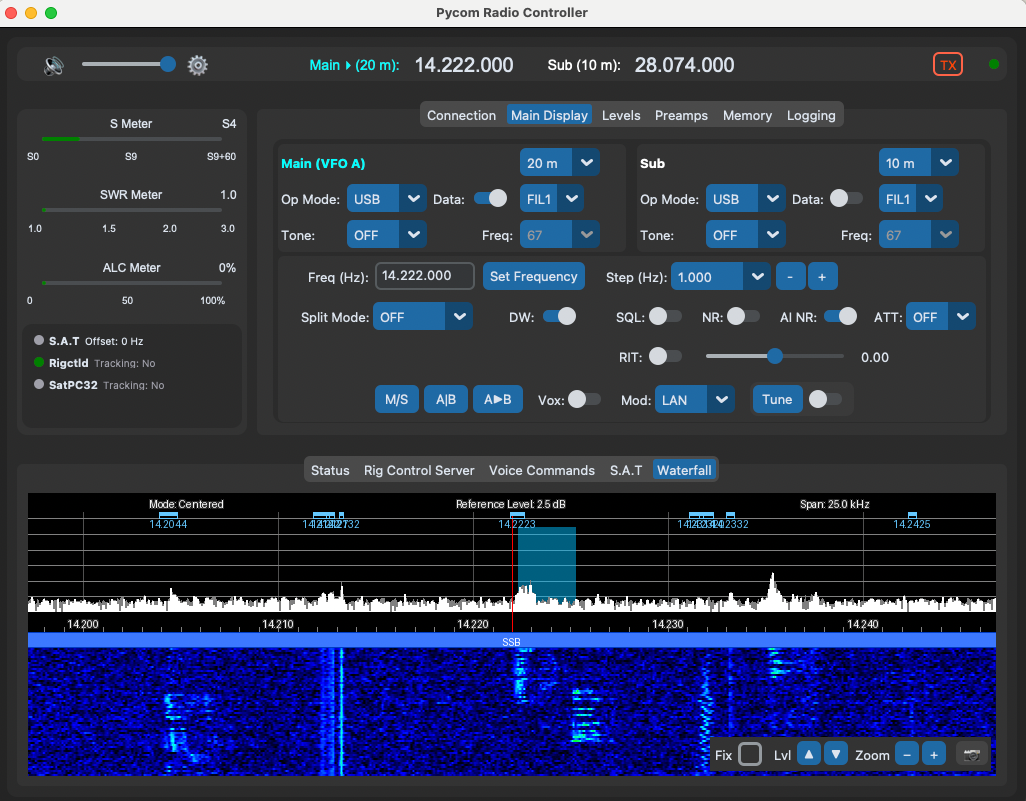
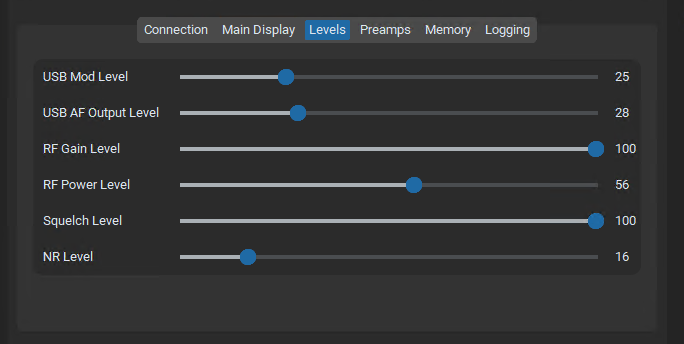
The default strength is 50. The control state is saved to your configuration and restored on startup.
How It Works (technical detail)
- Received audio is decoded to 48 kHz PCM — the model's native rate, no resampling needed
- Each channel (Main on the left, Sub on the right in two-channel mode) is processed independently with its own neural network state
- The strength slider blends the denoised result ("wet") with the original ("dry") — 0 is a full bypass with the model completely idle, 100 is fully processed
- Processing adds roughly 50–60 ms of latency to the audio path, which is not noticeable in normal operation
What to Expect
The model is trained on speech, so it performs best on voice modes — SSB in particular. Expect the biggest improvement against steady artificial noise: switch-mode power supplies, solar inverters, and LED lighting hash.
| Use case | Suggested setting |
|---|---|
| SSB voice | The sweet spot. Start at 50–80% and adjust to taste. |
| CW | The model may soften keying transients at high strengths. Lower the strength, or leave AI NR off when chasing weak CW. |
| Digital modes (FT8, FT4, etc.) | WSJT-X has its own excellent decoder; adding audio processing in front of it is not recommended. Turn AI NR off, or keep the strength low and A/B before trusting a decode. |
| Both NRs at once | The radio's NR and AI NR are independent. Stacking them is safe, but turn the radio's NR down first so you can hear what AI NR is actually doing. |
Availability
The AI NR controls are hidden entirely when the feature cannot run:
- macOS Intel — the machine-learning runtime (onnxruntime) has no release for this platform, so AI NR is not available. Everything else works normally.
- Missing model — if the model file has been deleted from
~/Pycom/audio/model/, the controls stay hidden until it is restored (restart the app after restoring, or reinstall to re-deploy the bundled copy).
Safety Nets #
- If inference ever runs slower than real time on your machine (an older CPU, for example), AI NR disables itself and returns you to unprocessed audio with a message in the log — it should not cause stuttering or dropouts.
- Any internal error bypasses processing rather than interrupting audio.
- Strength 0 is a complete bypass, both faster to reach than the switch and a handy A/B reference.
Replacing the Model (technical)
Bundled model provenance #
The bundled model is DPDFNet dpdfnet2_48khz_hr — a
causal, streaming speech-enhancement model from the DeepFilterNet2 family
with a dual-path RNN encoder, trained by the
DPDFNet project (Ceva-IP,
Apache-2.0 licence; project paper: arXiv:2512.16420).
Pycom does not ship the project's original weights — it ships the sherpa-onnx streaming ONNX export of the 48 kHz fullband variant, which adds the in-graph streaming state and the metadata contract Pycom's runtime expects:
-
Downloaded from:
https://huggingface.co/Ceva-IP/DPDFNet/resolve/main/onnx/dpdfnet2_48khz_hr.onnx
(part of the Ceva-IP/DPDFNet
model repository on Hugging Face,
onnx/dpdfnet2_48khz_hr.onnx) - Streaming metadata contract per the sherpa-onnx dpdfnet model definition (Apache-2.0) — see its dpdfnet model implementation
- The 48 kHz profile was chosen because it matches the radio's receive sample rate exactly — no resampling anywhere in the chain
You can swap in a different ONNX denoiser:
- Copy your model to
~/Pycom/audio/model/denoiser.onnxand restart the app. A user-supplied model is never overwritten by the app. - Reinstalling Pycom re-deploys the bundled default only if no user model exists — so your replacement survives upgrades.
- The bundled file above is also mirrored in the application source at
model/denoiser.onnxwith notes inmodel/denoiser_README.md.
A replacement model must meet these requirements — anything else is rejected at load and AI NR stays hidden:
| Requirement | Value |
|---|---|
| Format | ONNX |
| Sample rate | 48,000 Hz (the radio's receive rate — the app will not resample) |
| Streaming state | The graph must carry RNN state as explicit inputs/outputs (e.g. state_in/state_out), following the sherpa-onnx dpdfnet metadata contract: model_type=dpdfnet, sample_rate, n_fft, hop_length, window_length, freq_bins, state_size, erb_norm_state_size, spec_norm_state_size, erb_norm_init, spec_norm_init |
| Channels | Mono — stereo audio is split into independent per-channel streams before inference |
| Latency | Any frame-aligned latency works; it is measured automatically at load and the mix is aligned to match |
| Speed | Inference plus STFT must complete in under 10 ms per 10 ms frame on your CPU (the watchdog disables AI NR if it cannot keep up) |
File Locations
| Item | Location | Purpose |
|---|---|---|
| Denoiser model | ~/Pycom/audio/model/denoiser.onnx | The loaded model. User-supplied files take priority and are never overwritten. |
| Bundled model | inside the app bundle (model/) | Factory default, deployed to the user directory on first run |
| Model notes | model/denoiser_README.md in the app source | Provenance, licence, and measured performance of the bundled model |
Log messages about the denoiser appear in ~/Pycom/logs/pycom.log
under the Pycom.audio.denoiser logger — useful when diagnosing
why a replacement model was rejected.