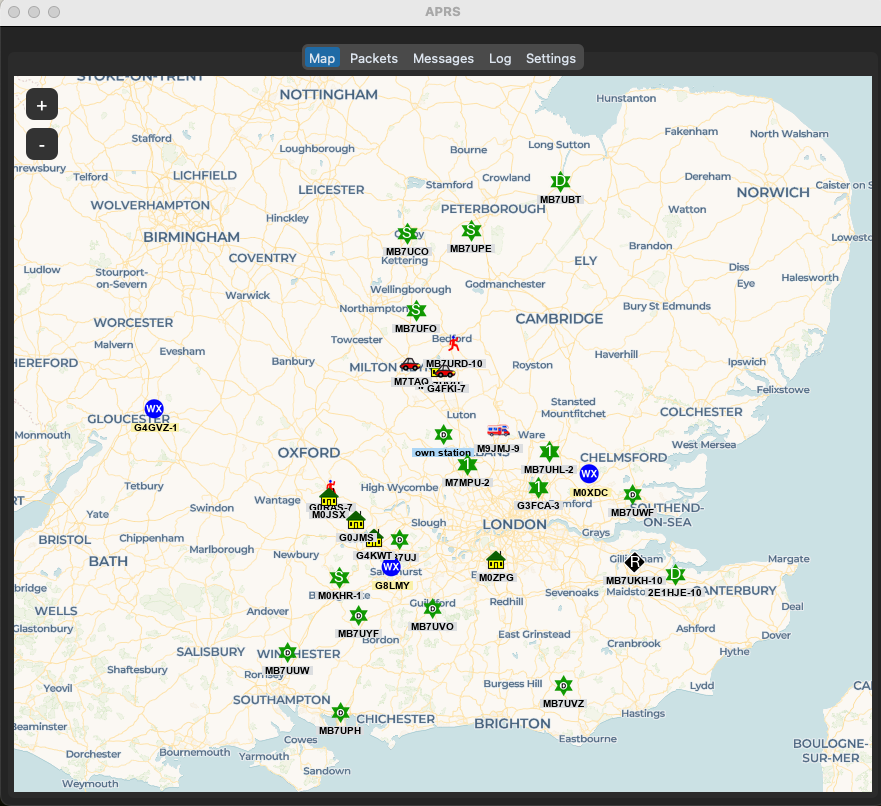
APRS turns the app into a complete packet station — an identifying beacon, position reports, weather, telemetry, objects and items on a live map, and messages with acknowledgement tracking. Received frames are colour-coded in the packet Log, and transmit goes over the radio itself (RF) or over the APRS-IS internet connection. Open it with Tools → APRS.
Beacon and Position
The identification beacon is sent on its configured interval, so other stations keep a current view of your station. Position reports use your Maidenhead grid square or a precise lat/long, and Send Position Now pushes the current position straight away. The beacon and the position report each take a per-send RF digi path — useful when the home path is not the right one for a portable session.
Messages
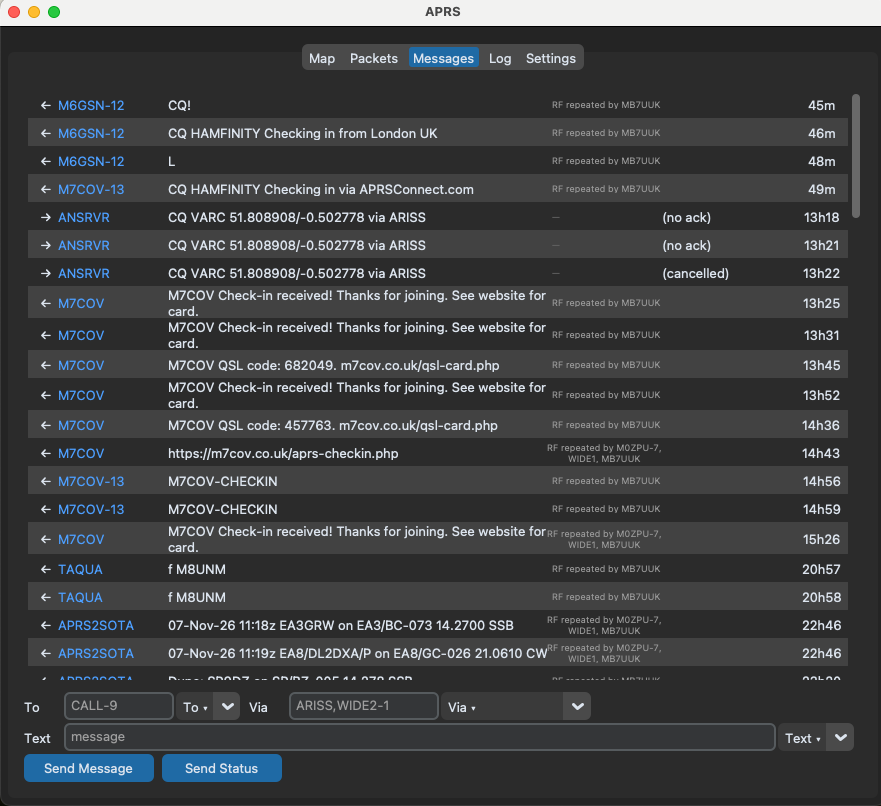
Messages are sent with acknowledgement tracking: acknowledged and still-pending states are visible, and re-send is one click. Incoming directed messages can be acknowledged automatically, so the station messaging you is never left waiting for an ack. Third-party messages unwrap to show the original sender, and the Email-2 flow replies through the email gateway. The station row shows the message a packet carried. Recent addressees, message texts and RF paths are kept for quick re-use.
Weather and Telemetry
Weather reports and telemetry are transmitted on their configured intervals; the telemetry carries full parameter and unit definitions. Both have a Send Now button — the send is queued to the manager worker, so the interface never blocks on RF timing.
Objects and Items
Objects and items are placed on the map with the full APRS symbol picker and are re-transmitted on their own schedule. Retiring one sends the dead form — with a retry that carries the object’s last live position, symbol table and symbol code, because aprs.fi refuses a positionless object kill and the record is read before it is removed.
Transmit Paths and TX Delay
On RF, the Via path is composed per send: message sends, the position report and the ID beacon each have a Via picker, and the last five RF paths you used are kept in a shared recents list. A TX delay, in milliseconds, sits in the Transmit settings: the radio keys up and holds before the AFSK audio starts, so a SPLIT or antenna switch completes in silence before anything goes on air.
Digipeater and iGate
The app can also digipeat and gate for you, each role on its own switch. The iGate passes the RF frames you receive up to APRS-IS if a real APRS-IS passcode is configured, and the digipeater retransmits received RF frames whose path is still due a hop through your callsign or a configured alias.
KISS Client and Server
The Connection card in the APRS settings hosts two KISS-over-TCP switches. The client (on by default) connects OUT to an external TNC's KISS server — Dire Wolf on localhost:8001 is the model: set the TNC host and port and tick Client. TNC-decoded packets feed the app's map, messages and stores, and the app's transmits go out through the TNC, so Dire Wolf keeps the radio and the sound card and the APRS stack rides along.
The server (off by default, listening on 127.0.0.1:8002) is the other direction: it broadcasts every frame the app decodes to KISS client software — PinPoint, UISS, APRSISCE/32, YAAC or another Dire Wolf — live over TCP with no polling. A frame arriving from a connected client is treated as a transmit request through the manager's normal TX machinery; frames from your own callsign are ignored, so a client echoing you back cannot loop.
The reason to run both at once: the app becomes the bridge between the two sides. Dire Wolf owns the radio and feeds decoded frames in through the client connection; every other APRS program on the desktop connects to the KISS server instead of reaching for the sound card themselves. One TNC, many programs, no contention.
Decode Quality
Each decode batch carries a quality line and FCS near-miss counters, so marginal decoding shows itself rather than being guessed at. The Log Levels tab has its own APRS row, so the packet-log noise can be turned down on its own.
Web Transmitter
Scripts and sensors on your network can feed the station: a POST to /api/aprs/tx accepts telemetry and weather payloads, plus status, bulletins, positions, objects and items. Every request carries the token the app serves on its own page as the data-token attribute — send it back in the X-Pycom-Token header with the JSON body {"payload": "..."}. The web transmitter is switched off until you enable it.
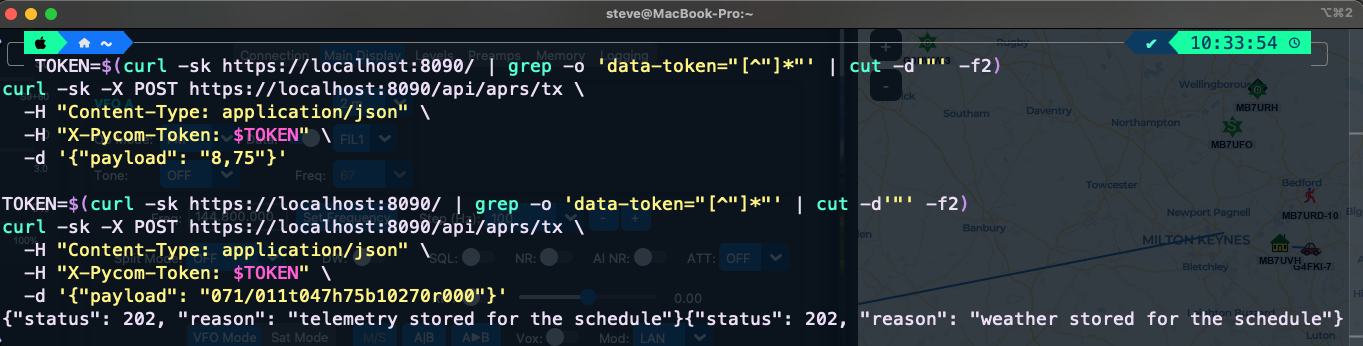
Telemetry and weather posts are stored, never sent by the POST itself: the reply is 202, for example {"status": 202, "reason": "telemetry stored for the schedule"}, and the scheduled interval does the keying under your callsign (nothing transmits while the interval switch is off). A telemetry payload is a raw CSV line — “8,75” is five analog values with the missing ones zero-filled — or a T# frame. A weather payload is the underscore-less field string, e.g. “071/011t047h75b10270r000”, or the same with a leading _.
The schedule's reading side has its own Source switch in the APRS window: Web server (POST /api/aprs/tx) or File. On File the scheduler reads the last non-empty line of the configured telemetry or weather file each interval instead of the posted slot — so a sensor can simply drop lines to a file, no HTTP involved. A payload posted while the source is set to File is still stored, and the 202 reason says so rather than hiding the mismatch.
Immediate sends — status, bulletins, positions, objects and items — transmit straight away subject to the web-TX gate, and position, status and message sends accept a per-send via digi path in the same request.
Each payload decides its kind; replies are 200 with the reason when a send keys up, 403 when the web-TX gate is off, 503 when the radio path is unavailable, and 422 with an explanation for anything the router cannot validate or classify. Examples, one per kind — the token and headers are the same as before, only the JSON body changes:
- Position report or beacon — a position payload is the beacon when it is the station's own line;
viais optional:{"payload": "!5134.80N/00118.00W>Portable this afternoon", "via": "WIDE1-1"}→{"status": 200, "reason": "position sent (APZPYC,WIDE1-1)"} - Status:
{"payload": ">On air from IO91 until 1300z"}→{"status": 200, "reason": "status sent"} - Broadcast message — CQ, QST, ALL or a
BLNbulletin (addressee space-padded to nine characters); directed stations are refused — those belong to the Messages tab, where they get acknowledged:{"payload": ":CQ :Who is about this evening?"}→{"status": 200, "reason": "broadcast sent"} - Object — the name field is space-padded to nine characters,
*marks alive:{"payload": ";CHECKPT *081100z5134.80N/00118.00W-Checkpoint"}→{"status": 200, "reason": "CHECKPT sent"}. The same line in its dead form replaces*with_—{"payload": ";CHECKPT _091200z"}→{"status": 200, "reason": "CHECKPT killed"}, with the map's last live position backfilled if the kill omits the position - Item — names run 3-9 characters with no padding, and there is no timestamp:
{"payload": ")Pump1!5148.75N/00032.50W-Fuel station"}. A kill replaces!with_:{"payload": ")Pump1_"}